

Referral traffic helps you understand which third-party websites are sending users to your site. In Databox, you can isolate these sessions from GA4 by using filters in Metric Builder.
Open the Metric Builder and select your GA4 Data Source.
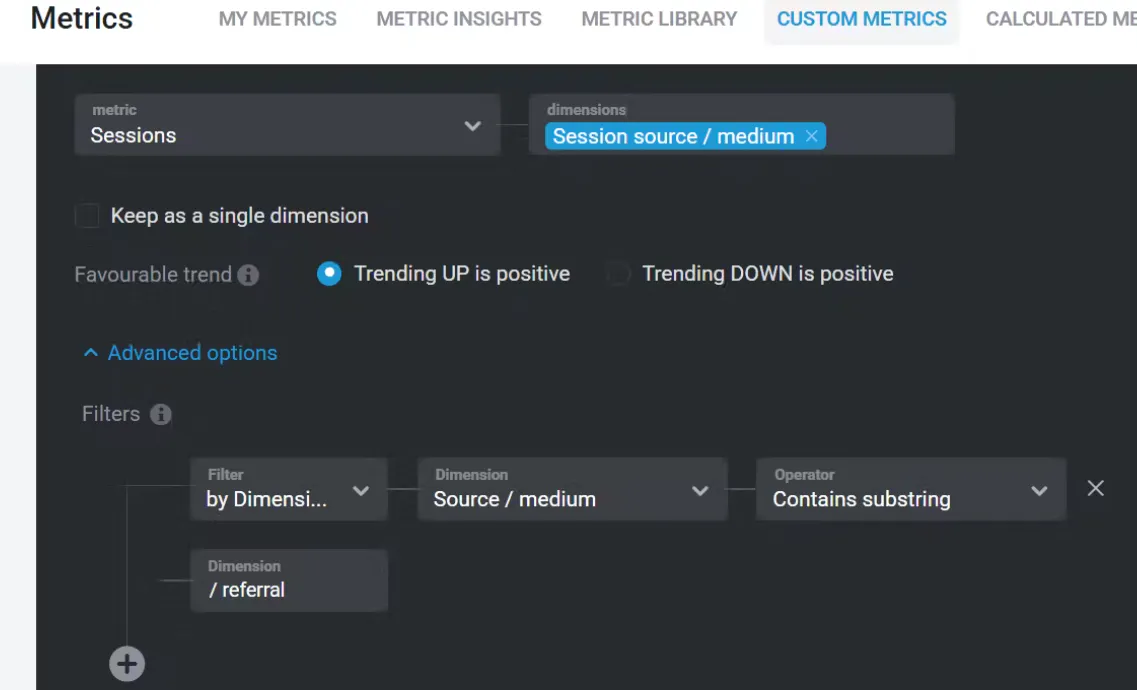
Set the metric to Sessions.
Choose any dimension you want to break the data down by (e.g., Page path, Country, Landing page, etc.).
Add a filter:
Dimension: Source / Medium
Condition: contains substring
Value: /referral
Save the Custom Metric and visualize it in your Databoard.
Filtering for referral sessions lets you:
Identify which external websites are driving traffic.
Analyze the quality of referral traffic by behavior or conversion.
Report more clearly on earned or partnership-driven traffic.
Learn more about using filters in Metric Builder: How to Build Custom Metrics Using Google Analytics 4 (GA4).