

When pulling standard Facebook Ads Metrics into Databox, you might notice that data includes both active and inactive campaigns or ad sets. This can clutter your reporting and make it harder to evaluate current performance. If you're only interested in tracking ongoing efforts, there's a better way by using Metric Builder to create filtered Custom Metrics.
With Metric Builder, you can isolate active campaigns or ads by applying a Status filter to your chosen Metrics, like Impressions, Clicks, or Amount Spent.
Go to Metric Builder and select Facebook Ads as the Data Source.
Choose a Metric, such as Impressions or Amount Spent.
For Dimension, select Campaign.
In the Filter section, add a filter for Ad Status and set it to Active.
Save the Custom Metric and add it to your Databoard.
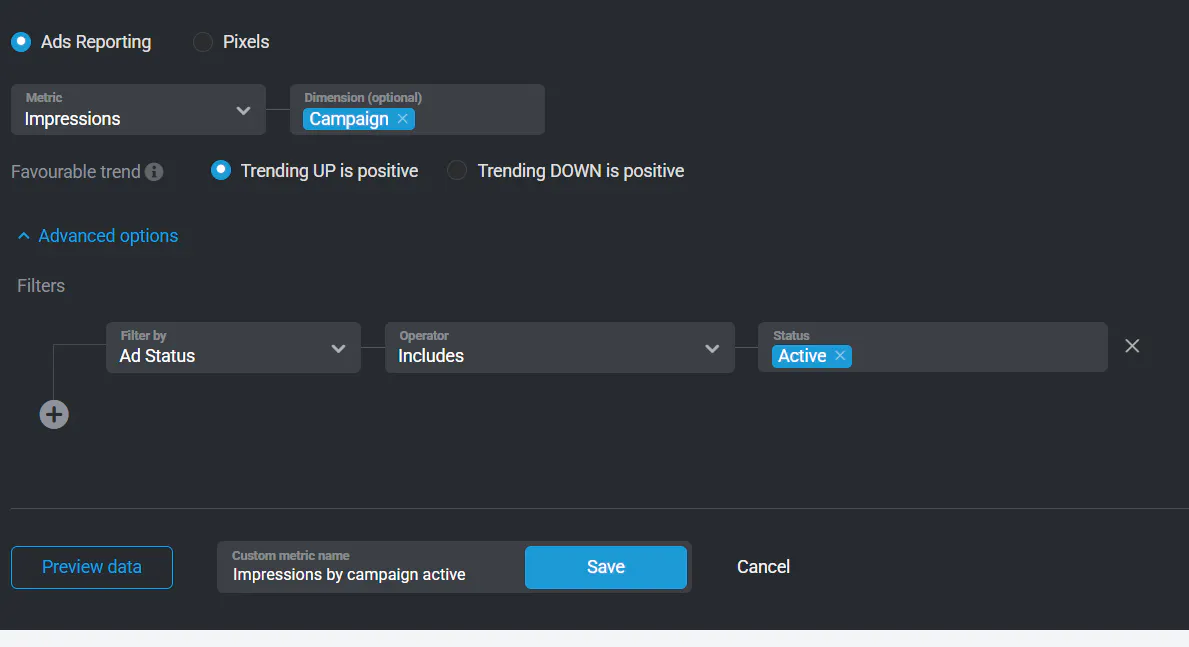
Using Metric Builder allows you to focus only on the campaigns or ads that are currently running, giving you a cleaner and more relevant view of ad performance. This is especially useful for real-time reporting, weekly performance reviews, or monitoring ongoing A/B tests.
Learn more in the Facebook Ads Metric Builder guide.
