

Need to know where visitors are submitting forms or triggering other key actions on your site? In Databox, you can create a Custom Metric that shows interactions like form submissions broken down by page. This makes it easier to attribute conversions to specific pages and optimize accordingly.
By using the Events Metric along with Page path and screen class as the Dimension in Google Analytics 4, you can filter for specific events like contact_form_submit or request_quote.
Go to Metric Builder and select Google Analytics 4 as the Data Source
Select Events as the Metric.
Set the Dimension to Page path and screen class.
In the Filter section, choose Event name and enter the specific interaction you want to track (e.g., contact_form_submit, request_quote).
Save the Custom Metric and add it to your Databoard.
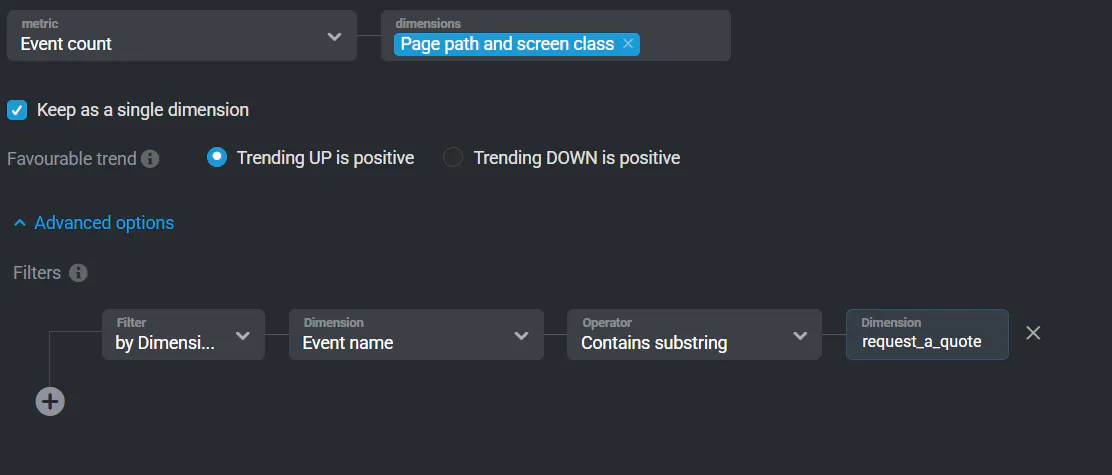
This view helps you connect on-page behavior to meaningful actions. Whether you're tracking lead submissions, downloads, or other engagement events, breaking them down by page gives you insights into what content or page layout is converting best.
Learn more in the Google Analytics 4 Metric Builder guide.
